



If you’re a serving member of the Indian Army, hamraaz personal login is your secure doorway to digital self-services—viewing payslips, downloading Form 16, checking profile details, and staying updated with administrative information. This in-depth guide distills what reliable sources and the official portal communicate today, then adds practical steps and troubleshooting so you can log in confidently without trial and error.
What Exactly Is Hamraaz Web?
Hamraaz Web is a secure online portal managed for Army personnel. It offers multiple sign-in types—including Personal Login, Unit Login, and RO Login—so each role accesses the right dashboard. For individual soldiers, personal login is the route to your own pay and service information.
Why “Personal Login” Matters
- It centralizes essential self-service tasks for JCOs/OR and other eligible users.
- It reduces paperwork by enabling digital access to payslips, Form 16, and related records.
- It includes built-in advisories and security prompts designed for military environments.
Verify You’re on the Right Portal (Avoid Look-Alikes)
Before you enter any credentials, confirm you’re at the official Hamraaz Web. Key cues you should see:
- A government .gov.in domain that includes hamraazmp8 in the address.
- A top navigation with Home, RO Login, Unit Login, Personal Login, Signup, and Forgot Password.
- Prominent safety advisories before login (e.g., use authorized links only, avoid public Wi-Fi, log out after use).
These signals help you distinguish the legitimate portal from copycats that use .com or .co.in patterns and mimic the interface. Staying vigilant here protects your PAN, mobile number, and pay data.
Who Can Use Hamraaz Personal Login?
Eligibility is limited to serving Indian Army personnel with a valid record in the system. Civilians are not authorized. You’ll need:
- PAN (used during signup/recovery)
- An active mobile number registered with your Record Office (RO)
- A functioning device/browser to complete captcha and OTP steps
A Quick Tour of Login Types (So You Pick the Right One)
- Personal Login: For individual soldiers to access personal pay and service information.
- Unit Login: For unit-level administrative access (not for personal records).
- RO Login: For Record Offices handling administrative workflows at scale.
If you only need your own payslip or Form 16, choose Personal Login every time.
Step-by-Step: Hamraaz Personal Login (Web)
Follow these precise steps when you use hamraaz personal login:
- Open the official Hamraaz Web portal. Confirm the domain ends in .gov.in and contains hamraazmp8. You should see a clean navigation bar with the three login types plus Signup and Forgot Password.
- Click Personal Login.
- On the pre-login advisory page, review and follow the safety prompts (authorized links only, no public networks, log out after use).
- Enter your User ID (commonly PAN, typically in uppercase), Password, and the Captcha exactly as shown.
- Complete the OTP verification sent to your registered mobile number (ensure the SIM is active and network is available).
- Select Login to access your personal dashboard.
Pro Tips That Prevent Most Errors
- Use uppercase PAN when the form expects it.
- Type the Captcha carefully—if it fails, refresh and retype.
- Keep your registered mobile number (stored with your RO) active; OTPs rely on it.
First-Time Signup (Registration)
If you’ve never used hamraaz personal login, register first:
- On the top menu, select Signup.
- Provide your PAN and other requested identity details exactly as they appear in your records.
- Verify with OTP on your registered mobile number.
- Set a strong password you’ll remember (avoid reuse from other accounts).
- Complete the process and return to Personal Login with your new credentials.
If the portal flags your PAN as invalid, double-check the format and case. If the issue persists, contact your unit/RO to ensure your PAN is correctly recorded.
Forgot Password? Here’s the Correct Reset Flow
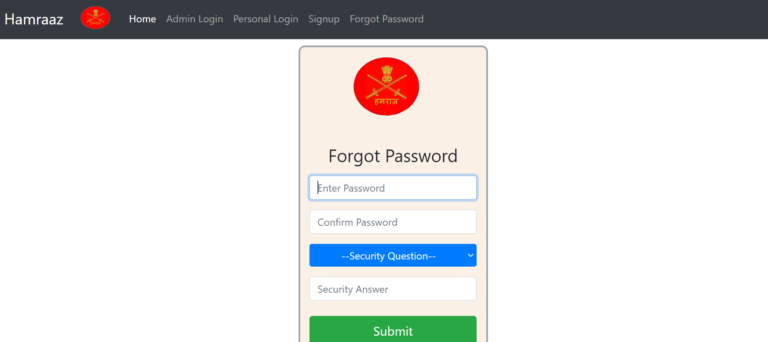
- Select Forgot Password from the top navigation.
- Enter your PAN and complete the Captcha.
- Confirm the OTP received on your registered mobile number.
- Create a new password and log in again from Personal Login.
If you’re not receiving OTPs, verify your registered mobile number with your Record Office and confirm network coverage.
What You Can Do After Hamraaz Personal Login
Once you’re in, hamraaz personal login typically surfaces services like:
- Payslip: View or download month-wise pay statements.
- Form 16: Download your annual tax certificate when released.
- Profile details: Check personal and service information.
- Notifications & Inbox: Stay current on relevant updates.
- Policies/Info: Access information circulars relevant to your category.
You may also find tools such as a Pay Calculator (to visualize pay fixation scenarios related to promotion/MACP). Use it for estimates only—official figures are as per PAO and your pay office records.
Security & Compliance: The Essentials Every Soldier Should Follow
The portal’s own pre-login checklist exists for a reason—follow it every time you use hamraaz personal login:
- Use only authorized government links; verify .gov.in and the hamraazmp8 identifier in the domain.
- Avoid public Wi-Fi and unknown hotspots.
- Keep device OS and apps updated.
- Disable location, Bluetooth, and Wi-Fi when not needed.
- Lock your device with a PIN/biometrics.
- Log out properly after every session.
These habits materially reduce the risk of credential theft and session hijacking.
Hamraaz on App Stores: Know the Difference
You’ll sometimes see similar-named apps on public app stores. Be careful:
- Not every “Hamraaz/Humraaz” on app stores is the Indian Army’s system.
- The genuine Army ecosystem directs users to the official Hamraaz Web and official government distribution channels.
- If you’re unsure, default to the web portal and follow the Personal Login path from there.
This prevents installing look-alike apps that harvest data or mislead soldiers.
Troubleshooting Common Login Errors
“Invalid PAN Card”
- Ensure the PAN is typed exactly as issued (uppercase, no spaces).
- If the error persists, your PAN may need correction at the Record Office side. Verify your records.
OTP Not Received
- Check network and SIM status on the registered number.
- Ensure Do Not Disturb isn’t blocking transactional SMS.
- If you’ve changed numbers, get the RO to update your registered mobile.
Captcha Keeps Failing
- Refresh the Captcha and retype carefully.
- Clear browser cache and try again, or switch to another modern browser.
Account Locked / Too Many Attempts
- Wait the indicated cooldown period, then try again.
- If still locked, escalate via your Unit/RO channel as per local instructions.
Dashboard Loads, but a Feature Doesn’t
- Log out, clear cache, and log in again.
- Try during non-peak hours.
- If an item appears missing (e.g., a very recent payslip), give processing time or check officially communicated release windows.
Best Practices for Strong, Memorable Passwords
- Use 12+ characters, mixing letters, numbers, and symbols.
- Avoid predictable words (unit names, ranks, family names, birthdays).
- Don’t reuse passwords from email or social media.
- Store passwords in a reputable password manager approved for your use.
Pay, Payslips, and Form 16: Practical Pointers
- Release cadence: Recent payslips appear once payroll finalizes; annual Form 16 posts after tax processing timelines.
- Download format: Typically PDF; keep your device updated to open secure PDFs reliably.
- Verification: Cross-check allowances, deductions, and Amount to Bank; escalate discrepancies through your unit’s established channels.
- Record-keeping: Maintain a personal archive of monthly payslips and yearly Form 16 files for loan applications and tax filings.
Hamraaz Personal Login vs. Unit/RO Workflows
It helps to separate personal self-service from administrative operations:
- Personal Login: Your individual financial and service view.
- Unit Login: Unit-level administrative forms and dashboards—don’t use this for your personal pay data.
- RO Login: Record Office interfaces used by authorized staff—again, not for individual self-service.
Using the correct entry point avoids errors and failed logins.
Quick Pre-Login Checklist
- Am I on the official .gov.in domain with hamraazmp8 in the address?
- Is my PAN ready (uppercase)?
- Is my registered mobile (with RO) active for OTP?
- Is my device on a private, secure connection?
- Do I have time to log out properly after I’m done?
If all answers are “yes,” you’re set for a smooth hamraaz personal login.
FAQs: Hamraaz Personal Login (2025)
1) Who can use hamraaz personal login?
Only serving Indian Army personnel with valid records and a registered mobile number through their Record Office.
2) Is hamraaz personal login available on a mobile app?
The safest, most consistent access for individuals is via the official web portal. If you see similarly named apps in public stores, treat them with caution and rely on the official Hamraaz Web entry point.
3) My OTP isn’t arriving—what should I do?
Confirm mobile signal, check SMS blocking (DND), and ensure the number registered with your RO is current. If you recently changed numbers, request the RO to update it.
4) Do I need to type PAN in uppercase?
Many forms expect PAN in uppercase. Enter it exactly as issued to avoid validation failures.
5) Can I view both payslips and Form 16 after hamraaz personal login?
Yes—once available for your account and financial year, you can view/download payslips and Form 16 from your dashboard.
6) I’m seeing “Invalid PAN Card” during signup or password reset. Why?
It usually means a format mismatch (case/spacing) or a record sync issue. Re-enter the PAN correctly; if it persists, coordinate with your Record Office.
7) What’s the difference between Personal, Unit, and RO logins?
Personal is for your individual data; Unit and RO are for authorized administrative users. Choose Personal Login for self-service.